USB 2.0 Header Motherboard- Complete Guide for PC Builders
A USB 2.0 header motherboard is a fundamental part of modern and legacy PC systems, allowing internal connections for front panel USB ports and various hardware components. While newer standards like USB 3.0 and USB-C dominate the market, USB 2.0 headers remain widely used due to their compatibility and reliability. Whether you are building a new PC or upgrading an existing one, understanding how these headers work can significantly improve your system’s functionality and overall user experience.
Learn about USB 2.0 header motherboard, its uses, features, installation, and benefits for PC builds. Complete beginner-friendly guide for better connectivity.
- What is a USB 2.0 Header on a Motherboard?
- Why USB 2.0 Headers Are Still Important
- Types of USB Headers on a Motherboard
- Structure and Pin Layout Explained
- Features of USB 2.0 Header Motherboards
- Benefits of Using USB 2.0 Headers
- How to Identify a USB 2.0 Header on a Motherboard
- How to Connect a USB 2.0 Header
- Common Uses of USB 2.0 Headers
- USB 2.0 vs USB 3.0: Understanding the Difference
- Common Problems and Solutions
- Tips for Choosing a Motherboard with USB 2.0 Headers
- Future of USB 2.0 Headers
- FAQ’s
- Conclusion
- Related post
What is a USB 2.0 Header on a Motherboard?
A USB 2.0 header is a group of pins located directly on the motherboard that enables internal USB connections.
These headers are primarily used to connect the front panel USB ports of your computer case, making it easier to plug in devices without accessing the back panel.
In most cases, a USB 2.0 header consists of 9 pins arranged in two rows, with one pin missing to ensure correct alignment.
This design prevents incorrect installation and protects your hardware from potential damage. Despite its simple structure, this small component plays a major role in improving accessibility and usability.
Key Characteristics
- Located on the motherboard PCB
- Standard 9-pin configuration
- Supports speeds up to 480 Mbps
- Enables internal USB connections
Why USB 2.0 Headers Are Still Important
Even in 2026, the USB 2.0 header motherboard continues to hold importance in PC building. While high-speed alternatives exist, many devices still rely on USB 2.0 due to its stability and widespread compatibility.
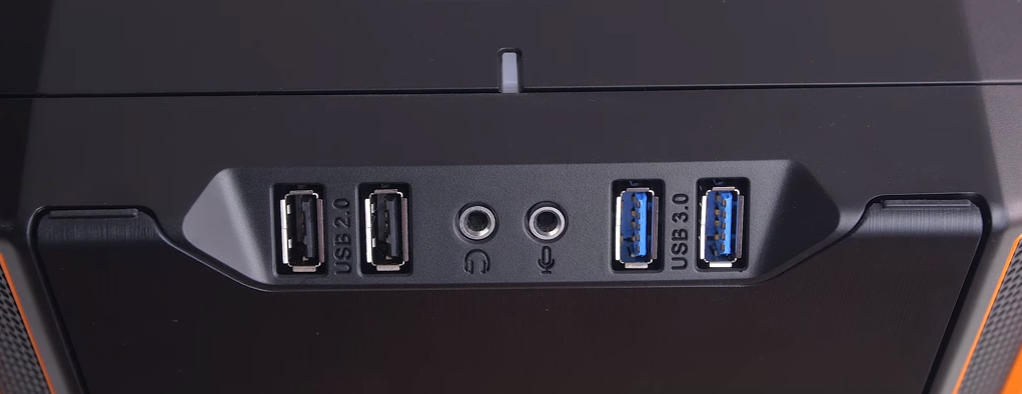
These headers are especially useful for connecting internal devices such as RGB controllers, fan hubs, and liquid cooling systems.
Since these components do not require high data transfer speeds, USB 2.0 provides a reliable and cost-effective solution.
Main Advantages
- High compatibility with older and newer devices
- Reliable connection for internal hardware
- Lower power consumption compared to newer standards
- Essential for many PC accessories
Because of these reasons, manufacturers still include USB 2.0 headers in most motherboards.
Types of USB Headers on a Motherboard
Motherboards typically include multiple types of USB headers, each designed for different purposes. Understanding these types helps you make better decisions when selecting a motherboard.
USB 2.0 Header
The most common type, used for basic peripherals and internal connections. It offers stable performance and is widely supported across all systems.
USB 3.0 Header
This header provides faster data transfer speeds and is used for modern front panel USB ports. It features a larger connector and improved performance.
USB Type-C Header
The latest addition, offering high-speed data transfer and a reversible design. It is commonly found in high-end motherboards.
While newer headers provide better performance, the USB 2.0 header motherboard remains essential due to its versatility.
Structure and Pin Layout Explained
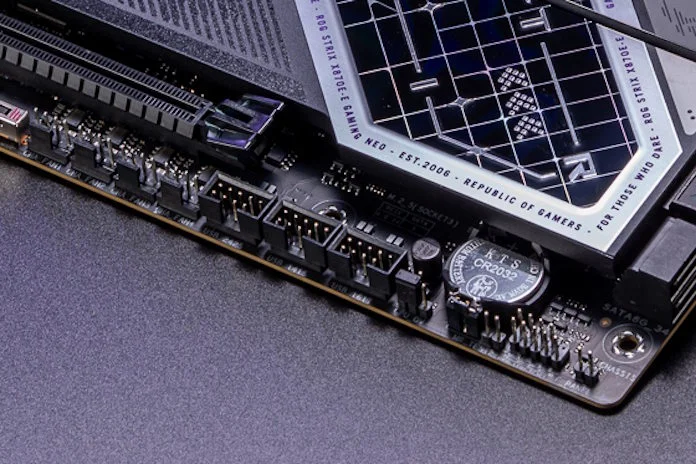
The structure of a USB 2.0 header is simple but requires careful attention during installation. The pins are arranged in two rows, typically with five pins on one side and four on the other.
Each pin has a specific function, including power delivery, data transmission, and grounding. The missing pin acts as a key to ensure the connector is inserted correctly.
Understanding this layout is important because incorrect installation can lead to malfunctioning USB ports or even hardware damage. Most motherboard manuals include diagrams that clearly show the pin configuration.
Features of USB 2.0 Header Motherboards
A motherboard equipped with USB 2.0 headers offers several useful features that enhance overall system functionality. These features are especially beneficial for users who rely on multiple peripherals and internal devices.
Important Features
- Supports multiple USB connections through a single header
- Provides stable and consistent data transfer
- Compatible with a wide range of devices
- Easy to install and configure
- Clearly labeled for user convenience
These features make USB 2.0 headers a practical choice for both beginners and advanced users.
Benefits of Using USB 2.0 Headers
Using a USB 2.0 header motherboard offers several advantages that improve both usability and system organization. One of the biggest benefits is the ability to connect front panel USB ports, making it easier to access devices without reaching behind your PC.
Additionally, these headers help reduce cable clutter by allowing internal connections. This leads to better cable management and improved airflow inside the case.
Key Benefits
- Convenient access to USB ports
- Cleaner internal setup
- Support for essential internal components
- Reduced reliance on external hubs
Overall, USB 2.0 headers contribute to a more efficient and user-friendly PC build.
How to Identify a USB 2.0 Header on a Motherboard
Identifying a USB 2.0 header motherboard is relatively simple if you know what to look for. These headers are usually located along the bottom edge of the motherboard and are labeled clearly.
You may see labels such as “USB,” “F_USB,” or “USB2.” The 9-pin layout is another easy way to recognize it. If you are unsure, the motherboard manual is always the best reference.
Taking the time to correctly identify the header ensures a smooth installation process and prevents potential mistakes.
How to Connect a USB 2.0 Header
Connecting a USB 2.0 header is a straightforward process, but it requires attention to detail. First, ensure that your PC is powered off and unplugged. Locate the header on the motherboard and align the connector with the missing pin.
Once aligned, gently press the connector into place. Avoid using excessive force, as this can bend the pins. After connecting, double-check the alignment to ensure everything is secure.
Proper installation ensures that your front panel USB ports function correctly without any issues.
Common Uses of USB 2.0 Headers
The USB 2.0 header motherboard is used for a variety of purposes in modern PC builds. While its primary function is to support front panel USB ports, it also plays a role in connecting internal devices.
Typical Uses
- Front panel USB ports
- RGB lighting controllers
- Liquid cooling systems
- Fan controllers
- Internal USB hubs
These applications highlight the versatility of USB 2.0 headers in everyday computing.
USB 2.0 vs USB 3.0: Understanding the Difference
While USB 2.0 and USB 3.0 serve similar purposes, they differ significantly in terms of performance. USB 3.0 offers much higher data transfer speeds, making it suitable for external storage devices and high-bandwidth applications.
However, USB 2.0 remains relevant due to its reliability and compatibility. For devices that do not require high speeds, USB 2.0 is more than sufficient.
Choosing between the two depends on your specific needs and the type of devices you use.
Common Problems and Solutions
Like any hardware component, USB 2.0 headers can sometimes cause issues. However, most problems are easy to fix with basic troubleshooting.
Common Issues
- USB ports not working due to loose connection
- Incorrect alignment of the connector
- Damaged pins on the header
- Device not being recognized
Solutions
- Reconnect the cable properly
- Check alignment with the missing pin
- Inspect the header for damage
- Update system drivers
Understanding these issues helps you quickly resolve problems and maintain system performance.
Tips for Choosing a Motherboard with USB 2.0 Headers
When selecting a motherboard, it is important to consider your current and future needs. A good motherboard should offer enough USB headers to support all your devices.
Look for clear labeling, reliable build quality, and compatibility with your PC case. It is also wise to choose a reputable brand to ensure long-term reliability.
Planning ahead can save you from needing upgrades later.
Future of USB 2.0 Headers
Although newer technologies are emerging, the USB 2.0 header motherboard is unlikely to disappear anytime soon. Its simplicity and compatibility make it a valuable feature in both budget and high-end systems.
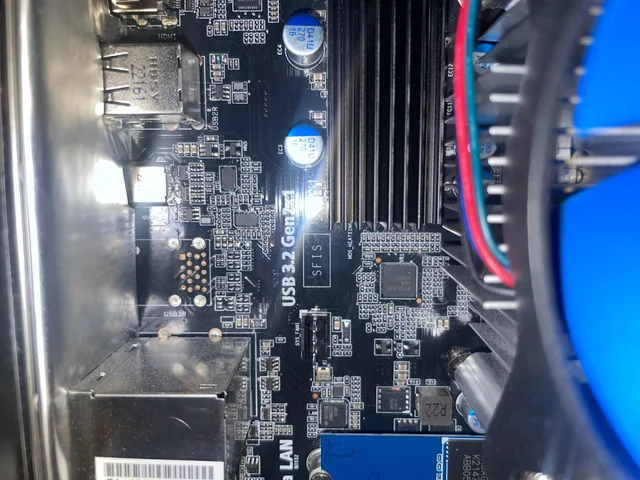
In the future, we may see hybrid motherboards that combine modern and legacy connectivity options. This ensures that users can continue to use older devices without sacrificing performance.
FAQ’s
1.What is a USB 2.0 header on a motherboard?
A USB 2.0 header is a set of pins on the motherboard that allows internal USB connections for front panel ports and various internal components.
2.How many ports does one USB 2.0 header support?
A single USB 2.0 header typically supports two USB ports, making it efficient for connecting front panel USB cables in a PC case.
3.Is USB 2.0 still relevant today?
Yes, USB 2.0 is still widely used because of its compatibility, reliability, and ability to support many internal and external devices efficiently.
4.Can I use USB 3.0 with a USB 2.0 header?
No, USB 3.0 requires a different connector and header, although adapters may allow limited compatibility in some cases.
5.Where is the USB 2.0 header located?
It is usually located at the bottom of the motherboard and labeled clearly, making it easy to identify during installation.
Conclusion
The USB 2.0 header motherboard remains an essential component in modern PC builds despite the rise of newer technologies. It offers reliable connectivity, supports a wide range of devices, and improves overall system usability. Whether you are a beginner or an experienced builder, understanding how USB 2.0 headers work will help you create a more efficient and organized PC setup that meets both current and future needs.